
You're asking
If you have any questions, you can find the answers here. We’re always ready to help you, too.
IDOL is the integrated transportation system of the Liberec Region; it is also known as the Liberec Region’s integrated transportation system. It coordinates the activities of all participating transportation providers, thereby ensuring the smooth operation of public transportation in the region.
I need an ID for multi-day "Časovky" and "Síťovky" passes
For daily or very frequent travel on IDOL, it’s worth purchasing multi-day passes (Time Passes or Network Passes) valid for 7, 30, 90, or 366 days.
Time Tickets are suitable for repeated travel on a single route—a single trip.
Network Passes allow for unlimited travel throughout the entire IDOL network.
You can find the most affordable fare in the Idolka app or on our fare calculator.
Register on the IDOL e-shop, where you can manage your account yourself. To purchase a Time Pass or Network Pass, select the desired identifier, or order a new personal Opuscard+. You can also register and make purchases using the Idolka mobile app.
On IDOL-participating transit vehicles, you check in using your selected identifier, to which your purchased pass is linked (the check-in process on Liberec public transit may differ from other IDOL transit vehicles). The number of trips is unlimited within the coupon’s validity period and coverage area .
Overview of identifiers for Time-Based and Network-Based passes:
{control article:pill "idolka/,verejna-doprava/identifikatory-a-nosice/platebni-karta/,verejna-doprava/identifikatory-a-nosice/opuscard-plus/,verejna-doprava/identifikatory-a-nosice/in-karta-litacka/"}
I'll save money with an e-wallet
For occasional trips where it doesn’t make sense to buy a multi-day pass, use single-ride fares purchased via cashless payment. You can use the Idolka mobile app, the Opuscard+ e-wallet (including the old Opuscard), or a payment card.
Fares purchased this way are usually cheaper than cash fares. You can still buy single-ride tickets from the driver.
Overview of payment methods available for purchasing single-ride tickets:
The Idolka mobile app is the ideal solution for all fare combinations
The Idolka mobile app is a universal solution for both occasional and regular travel . It serves as a carrier for single-ride tickets or as an identifier for 7-, 30-, 90-, or 366-day passes. It finds the fastest transit connections within the IDOL network and displays the locations of stops and OPUSCARD contact points on a map. Using GPS, it can pinpoint the location of the nearest stop and offers additional features, such as the latest news from IDOL. You can also manage your user account in Idolka.
Individual tickets are valid for a set period, and purchased sessions or network-wide offers allow for transfers. You can purchase them in the Idolka app using a credit card before starting your trip and activate them as needed.
Time-based tickets are ideal for repeated trips to school or work along a single route.
Network passes allow for unlimited travel across the entire IDOL network and are available for both regular travelers (multi-day) and as a 24-hour option.
You can find the most affordable farein the Idolka app or using our fare calculator.
For more information and to download the app, visit www.idolka.cz or www.iidol.cz.
Within the Liberec zone (generally defined as the area served by public transit routes), all types of IDOL tickets can be used for full-fledged validation on DPMLJ buses and trams, as well as on trains and regional buses.
Passengers may board vehicles on Liberec public transit routes through any door; validation is self-service, and tickets are checked by inspectors.
- Single-ride IDOL tickets are sold on a self-service basis on Liberec public transit vehicles. Purchases made at green ticket terminals allow passengers to buy tickets for any zone within the IDOL network in the form of a paper IDOL transfer ticket with a QR code.
The green terminals only accept cashless payments from the Opuscard+ electronic wallet (the original Opuscard also works) or a payment card. The ticket becomes valid at the time of purchase. - Passengers with a valid IDOL coupon on their identifier (Opuscard+, Idolka, In Karta, Lítačka, or a payment card) do not need to check in when boarding .
- Passengers with a single-ride paper IDOL ticket featuring a QR code or an active electronic ticket in the Idolka app do not need to validate their ticket upon boarding .
- DPMLJ single-ridepaper tickets, which are valid only on Liberec public transit vehicles, must be mechanically validated in the orange ticket validators upon boarding.
- Only ticket inspectors check all IDOL tickets on all media and identifiers. There are no ticket readers on the vehicles (except for the validators for non-integrated DPMLJ tickets).
- Liberec public transit drivers sell only non-integrated tickets for Liberec public transit routes.
Cash top-ups for Opuscard/Opuscard+ are available at all OPUSCARD service points, but not on Liberec public transit vehicles.
IDOL ticket carriers are valid on services included in the IDOL integrated transit system. These include local, express, and high-speed trains within the IDOL service area in the Liberec Region and on selected sections extending to other locations outside the Liberec Region, regional and some long-distance buses in the Liberec Region, as well as some routes to other locations outside the Liberec Region, and all public transit services in all cities of the Liberec Region.
Some long-distance bus routes, certain bike buses, and similar special tourist buses are not included in IDOL; IDOL is also not valid on special historic train or bus trips (unless otherwise noted).
Inclusion in the IDOL system is indicated in the timetables; a complete list of routes and connections can be found under “Tariffs and SPP IDOL.”
On regional bus routes that are covered by the IDOL fare zone along their entire route, it is not possible to use the carrier’s own fare. Some routes accept the connecting IDS fare for part of their route or even sell it (e.g., IREDO).
For rail carriers included in the IDOL fare system, the carrier’s own fare is not prohibited within the IDOL service area. However, a ticket purchased in this way is valid exclusively on trains operated by that specific carrier and cannot be used for travel on other carriers (including rail carriers).
Check-in when a passenger uses their identifier (Opuscard, Opuscard+, the Idolka mobile app, or a bank card) or with cash, or if a single transfer ticket, a time-limited ticket, or a network pass has been assigned to their identifier (Opuscard+, the Idolka mobile app, Inkarta, Lítačka, or bank card) as follows:
Single transfer ticket
A single transfer ticket—a paper ticket with a QR code purchased from the Opuscard or Opuscard+ electronic wallet, via the Idolka app, with a bank card, or with cash, valid to the destination station—is validated upon transfer as follows. Passengers are required to keep the paper transfer ticket with them at all times during the journey to the purchased destination station.
Buses:
The passenger informs the driver of their destination and mentions that they have a transfer ticket. They scan the QR code on the ticket or in the app using the check-in device’s scanner and, along with the ticket, present any documentation proving eligibility for a discount. If the ticket is valid and allows sufficient time to complete the journey to the destination station, validation is free of charge.
Trains:
The passenger informs the onboard staff of their destination station and mentions that they have purchased a transfer ticket. The on-board staff will scan the QR code on the ticket or in the app using the check-in device’s scanner; the passenger must present proof of eligibility for any applicable discount along with the ticket. If the ticket is valid and allows sufficient time to reach the destination station, boarding is permitted without any additional charge. If the train is equipped with a validator (an orange device in the boarding area—typically found on trains on the routes from Liberec to Hrádek nad Nisou, from Liberec to Frýdlant including all routes in the Frýdlant region, from Liberec to Harrachov including the Smržovka – Josefův Důl, and on some trains on the Tanvald–Železný Brod line), passengers must tap their card on the validator upon boarding.
Public transportation in Liberec:
Passengers do not need to check in when transferring to public transit in Liberec. Ticket inspectors conduct random checks to verify the validity of tickets. During such a check, passengers must present a valid paper ticket along with any documentation proving eligibility for a discount. The fare inspector scans the QR code on the ticket using the ticket validator’s scanner. If the ticket is valid and has sufficient time remaining to reach the destination station, the fare is validated without any additional charge.
Public transportation in Česká Lípa and Jablonec nad Nisou:
Passengers tell the driver their destination and mention that they have purchased a transfer ticket. They scan the QR code on the ticket or in the app using the ticket validator and, along with the ticket, present any documentation proving eligibility for a discount. If the ticket is valid and allows sufficient time to reach the destination station, the fare is processed without any additional charge.
Time Ticket/Network Ticket
If a passenger has purchased a time ticket or network pass linked to their identifier (Opuscard+, Idolka mobile app, Inkarta, Lítačka, bank card), check-in proceeds as follows:
Buses:
The passenger tells the driver their destination and mentions that they have a time-based or network pass. They present the ID linked to the pass, and the driver scans it at the fare collection device. If the passenger has a ticket in the Idolka mobile app, they scan the QR code in the app using the ticket validator’s scanner. Along with their ID, they present any documentation proving eligibility for a discount. If the coupon is valid and was purchased for the correct fare zone, check-in is free of charge.
Trains:
The passenger informs the train crew of their destination station, noting that they have a time-limited or network coupon. They present the identifier for which the time-based or network coupon was purchased, and the onboard staff checks the identifier on the ticketing device. If the passenger has a ticket in the Idolka mobile app, they will scan the QR code in the app using the ticket validator’s scanner. Along with their ID, they will present any documentation proving eligibility for a discount. If the coupon is valid and was purchased for the correct fare zone, check-in is completed without any additional charge. If the train is equipped with a validator (an orange device in the boarding area—typically found on trains on the routes from Liberec to Hrádek nad Nisou, from Liberec to Frýdlant including all routes in the Frýdlant region, from Liberec to Harrachov including the Smržovka – Josefův Důl, and on some trains on the Tanvald–Železný Brod line), passengers must hold their ticket up to the validator upon boarding.
Public Transportation in Liberec:
Passengers do not need to check in when boarding public transit in Liberec. Ticket inspectors conduct random checks to verify the validity of tickets. During such an inspection, passengers must present the identifier associated with the purchased ticket or the QR code from the Idolka mobile app, along with any documentation proving eligibility for a discount. The inspector will scan the identifier on the ticket validation device. If a passenger has a ticket in the Idolka mobile app, they scan the QR code in the app using the ticket validator’s scanner. Along with the ticket, they present proof of eligibility for any applicable discount. If the coupon is valid and was purchased for the correct fare zone, check-in is free of charge.
Public transportation in Česká Lípa and Jablonec nad Nisou:
The passenger tells the driver their destination and mentions that they have a time-based or network coupon. They present the ID associated with the time-based or network coupon, and the driver scans it at the fare validation device. If the passenger has a ticket in the Idolka mobile app, they scan the QR code in the app using the ticket validator’s scanner. Along with their ID, they present any documentation proving eligibility for a discount. If the coupon is valid and was purchased for the correct fare zone, check-in is completed without any additional charge.
When boarding a public transit vehicle, passengers are encouraged to use the fare option valid for that specific public transit zone.
On public transit in Česká Lípa, Jablonec nad Nisou, and Turnov, you can request a paper integrated ticket for any IDOL zone or purchase a network-wide ticket.
On public transit in Liberec, you can temporarily purchase only a single-zone integrated ticket from the electronic wallet on the old (red) Opuscard for all modes of transportation within the Liberec zone or for travel between Liberec and Jablonec nad Nisou (which is not valid on Jablonec nad Nisou public transit). An alternative is the Idolka mobile app, which allows you to start your journey in the Liberec zone on any mode of transportation.
At the beginning of 2024, terminals are expected to go into operation on all Liberec public transit vehicles, enabling self-service ticket purchases for any IDOL zone, including the use of the electronic wallet on the new Opuscard+ card
Time Trial
Passes purchased for a specific fare zone are valid for the selected period in both directions within that zone. You can use both bus and train connections included in IDOL for travel.
With a pass that includes public transit zones, you can travel freely on public transit within the scope of the purchased pass. A purchased Time Pass is valid for a specific period of time, regardless of how many times it is used.
We recommend carrying proof of purchase with you. For more information, see the current version of the IDOL Fare Schedule.
Network Pass
A pass valid for all fare zones in the IDOL network. You can use it to travel on buses, trains, and public transit included in the IDOL network.
A purchased Network Pass is valid for a specific period of time, regardless of how many times it is used.
We recommend that you carry your proof of purchase with you. For more information, please refer to the current version of the IDOL Fare Schedule.
The validity period of a ticket is specified in the IDOL Fare Schedule, which further stipulates that passengers must use a service that, according to the timetable, arrives at the destination stop no later than the time the ticket expires.
The validity period is determined based on the fare distance and the price paid, and is generally set to cover most possible connections with some leeway. However, there may be exceptions where the validity period is insufficient for the entire intended route (for example, when taking a long detour or during a longer wait while transferring), in which case it is not possible to travel on a single ticket, and it is necessary to purchase separate tickets for each leg of the journey so that the passenger always has a valid ticket.
Passengers present their payment card to the driver or conductor, who scans the ticket electronically. This information appears on the validation device. If a pre-loaded time-based or network ticket is scanned, the information—including the holder’s photo—will be displayed.
Yes, during a ticket inspection, you must present not only a valid ticket but also a form of identification, such as an ID card, student ID, etc.
It is no longer possible to purchase Časovka or Síťovka in vehicles. You can use the Idolka mobile app or our e-shop.
Yes, of course, wherever payment cards are accepted, you can use Opuscard+ as an electronic wallet—that is, with the driver, at the ČD ticket counter, with train conductors on IDOL trains, or at an IDOL service point.
This is not currently possible. However, ENT+ tickets can be purchased directly on the vehicle from the driver, the conductor, or at the ticket window.
Yes, if your e-wallet has a balance, this is of course possible, just as it is for paying any other fare.
Students can enter their ISIC card number into their e-shop account , which entitles them to discounted fares; the discounted fare category can also be adjusted at OPUSCARD service centers. For other discounted categories (seniors, children, people with disabilities, etc.), you must visit an OPUSCARD service center, where a staff member will set the correct fare category based on the appropriate documentation.
Current price – The card issuance fee can be found in the price list. – The card issuance fee can be found in the price list.
Usually a few days. If there is high demand, production may take up to 30 days. We'll mail the card to your mailbox.
Yes. At the European House in Liberec, we'll make your card while you wait, including taking your photo.
Yes. Each family member can have their own card with their own ID number.
Block it at the contact point. You can transfer a valid coupon to a new ID.
After selecting your ticket, you'll pay with a credit or debit card directly in the app. You can save your card for future purchases. Learn more about payment here.
No. The Idolka is everything you need for traveling. It serves as both an ID and a wallet.
Idolka is a mobile app that lets you manage your travel account. It’s linked to your bank account and replaces both cards and paper tickets. You can download it for free. You can use it to manage tickets for the whole family (through linked accounts).
Idolka serves as an identifier. When you purchase a Časovka, Síťovka, or ticket through the app, you show the QR code in the app during a ticket inspection. Thanks to its integration with your payment card, Idolka also functions as an electronic wallet.
No. You only need an internet connection to purchase and activate your ticket. During a ticket inspection, simply show your active ticket on your phone.
No. With Idolka, you have everything on your phone. You don't need a SIM card.
Yes. In the app, you can choose from the full range of fares, including baggage fees.
Yes. In the app, you can choose from the complete selection of all Time-Limited and Network-Exclusive offers. Select your identifier (your cell phone), and the coupon will be loaded into the app. You can also see the remaining validity period in the app.
Yes. Payment is processed through a secure payment gateway. During an inspection, the inspector will only scan the QR code; they cannot see your payment information.
- Log in to the app
- Select the ticket you want
- Pay with your card
- Activate your ticket 1 minute before boarding
Tickets purchased through the app are available at a discounted price compared to buying them on the vehicle.
IMPORTANT: The ticket is invalid unless activated! You must activate it after payment.
Yes. In the app, you can choose from all the Time-Based and Network-Based options. You can also see the remaining validity period there.
You have two options:
Activate Now
After payment, click "Activate Now." A 60-second countdown will begin, and then you can board. Your ticket is valid.
Activate Later
After payment, select "Activate Later Manually." The ticket will be saved in the Tickets tab. You can activate it later by clicking "Activate." You can choose to activate it immediately or schedule it for a specific time.
Tip: Buy tickets in advance to have them on hand. Then all you have to do is select and activate them in the Tickets tab.
Important: A ticket is invalid unless activated!
Not exactly. But a saved payment card works similarly. Once you save the card, you can pay with a single click.
Up to 10 tickets at a time. After clicking on the selected ticket, choose the quantity. You can buy tickets:
- For your own use
- For someone else (send them via the app)
- For a group (you’ll have all the tickets on your phone, but you must travel together)
You’ll need an internet or Wi-Fi connection to activate your ticket. Activate your ticket 1 minute before boarding.
Yes, it is completely safe. Your data cannot be stolen. The ticket inspector, driver, or conductor will scan the QR code or use NFC. Their device will display whether you have a valid ticket, including your photo.
Not directly, but a saved payment card serves the same purpose. This allows you to purchase multiple tickets, for example, for your friends or family.
Yes. In the app, you can choose from the full range of fares, including baggage fees.
Idolka finds connections between all stops in the IDOL system. It recommends the most suitable fare and alerts you to news or service disruptions.
Not yet. This feature is in development.
You can purchase paper tickets at self-service terminals on board vehicles, from the driver, at IDOL ticket offices, and at most newsstands. In addition to cash, you can also pay by credit card or using an electronic wallet on Opuscard or Opuscard+.
When paying in cash, the discounted price for paper tickets does not apply. Discounted prices apply when paying by credit card, via the Opuscard or Opuscard+ e-wallet, and for individual electronic tickets purchased through the Idolka app.
All paper tickets are now transferable; that is, non-transferable tickets are being phased out.
These cards are partner cards issued by České dráhy and Pražská integrovaná doprava. They serve as identifiers for long-term passes (Časovek and Síťovek). Once linked to an account with a photo, you can use them on all IDOL routes.
You don't need one if you plan to use the Časovka or Síťovka passes for an extended period. However, to purchase individual tickets, you'll need the Idolka mobile app or a payment card.
Yes. In the online store, you can choose from all available Časovka and Síťovka options and select either In Karta or Lítačka as your identifier. To register, enter your card number and expiration date. To activate your account, you must upload a photo. Alternatively, you can visit an IDOL service center.
Sign up at eshop.iidol.cz. If you already have an account in the Idolka app or the PID Lítačka system, use the same login credentials.
No, you cannot use In Karta or Lítačka to purchase single-ride tickets. Please use a payment card or the Idolka mobile app.
No, you cannot use these cards as an electronic wallet in the IDOL system.
Yes, you can have multiple IDs (for example, both In Kartu and Opuscard+). However, each coupon can only be associated with one of them at a time. You can transfer coupons between IDs in the online store or at a service location.
First, contact your card issuer:
- In Karta: Czech Railways
- Lítačka: Prague Integrated Transport
Then contact us and we will block it as an identifier in IDOL as well:
- Customer Service: 488 588 788
- Email: info@korid.cz
- Form: www.iidol.cz
- In person: At any IDOL contact point
We will transfer your valid coupon to your new ID.
The overlap area is the region in the Central Bohemian and Liberec Regions where both the PID Fare and the IDOL Fare apply. Specific rules apply to trips within the overlap area.
Stops in the overlap area within the Liberec Region (the furthest point reachable under the PID Fare):
- Svijany
- Turnov
- Paceřice
- Příšovice
- Přepeře
- Modřišice
Stops in the overlapping area within the Central Bohemian Region (as far as you can travel using the IDOL fare):
- Mladá Boleslav
- Kosmonosy
- Bakov nad Jizerou
- Mnichovo Hradiště
- Březina, Loukov
- Overlap

How the overlapping fare system works.
We currently use two types of interregional fare integration between the Liberec Region Integrated Transport (IDOL) and the Prague Integrated Transport (PID).
The second type of fare connection is based on an overlap. By this we mean an area where the IDOL and PID fare zones do not merely meet, but share a common section where both apply, and beyond the overlap, the fare is calculated by adding the IDOL section to the PID section (or vice versa).
Both fare systems, IDOL and PID, share a common area of validity in the section from Paceřice and Turnov-Mladá Boleslav, respectively. A passenger traveling from the Liberec Region on a line integrated into both IDOL and PID to a stop that is outside the Liberec Region but still within the area where the two systems overlap and IDOL is valid may use the IDOL fare all the way to the last station where IDOL is valid and the connection stops there. The same applies to a passenger using the PID fare who is traveling from the Central Bohemian Region. The restriction applies only if the passenger wishes to begin and end their journey within the territory of a neighboring region. In that case, they must use the neighboring region’s fare. If the journey begins and ends within the overlapping area and the passenger crosses a regional border during the trip, they may choose which fare to pay. If the passenger does not make this choice themselves, the fare is determined by the region in whose territory the journey begins. If the passenger travels further beyond the boundary of the overlapping area, a fare transition occurs, as described in the first case, but with a slight difference here. Unless the passenger specifies otherwise, fares automatically change at the last stop within the overlapping area in the direction of travel. This means that the fare amount may differ in each direction.
Overlap (beyond the standard fare in combination with a split fare) is currently used on lines 345, 700, 717, 720, 730, L4, R22, R21, S30, as well as between Mladá Boleslav Main Station and Mladá Boleslav City.
- The SPP PID is valid within the Central Bohemian Region up to the stop specified in the SPP.
- The SPP IDOL is valid within the Liberec Region up to the stop specified in the SPP.
- Free transportation under the PID Fare (70+, ZTP, and ZTP/P) is provided only within Prague and the Central Bohemian Region, in accordance with the territorial scope of the SPP PID.
These overlaps will make it easier to travel short distances across regional borders. Passengers can choose which integrated transit system fare to use for their trip—the PID fare or the IDOL fare.
This is a time-of-day fare. Ticket formats: paper transfer ticket , mobile ticket stored in the PID Lítačka app, and time-based coupons linked to identifiers registered in MOS (more at www.pidlitacka.cz). You can find all information about the fare at www.pid.cz.
Luggage is charged a one-time fee based on the fare from which you are departing. However, this applies only to that specific route and is not transferable to the adjacent IDS network.
It depends on the number of fare zones traveled through (listed in the timetables) and also on the travel time. For example, when traveling from Mladá Boleslav to Turnov, you’ll pay 50 Kč for a full-price fare and 12 Kč for a discounted fare. Mladá Boleslav is in PID fare zone 7, and Turnov is in PID fare zone 11. Therefore, for this PID trip, I need a 5-zone ticket, which is valid for 2 hours.
Yes, within the coverage area of the PID fare plan www.pidlitacka.cz. However, it cannot be used for trips within the Liberec Region.
Yes, in cases where routes overlap, you can use the time-based fare under the PID Tariff or the IDOL Tariff. However, the condition that the trip crosses a regional border must be met. If the above condition is not met, the fare of the region in which you are traveling applies.
It depends on the type of ticket you use. For example, when traveling from Mladá Boleslav to Liberec, a paper ticket is valid only on that specific route. IDOL transfer tickets are loaded onto the Opuscard chip card (www.opuscard.cz). In addition to the destination zone, the ticket is also valid for a specific time period, and in Liberec, you can use it, for example, to transfer to public transportation.
For this route, both IDOL and PID tickets are required, and they must be used in the order corresponding to the direction of travel. If you’re traveling from Liberec, purchase an IDOL ticket to the last station where the two systems overlap, and then use a PID ticket for the remainder of the journey. If you already have a valid ticket (such as a pass) from a specific fare point within the destination IDS, you can tell the driver where or from where each ticket is valid.
Yes, within the area covered by the IDOL fare plan. However, it cannot be used for trips within the Central Bohemian Region.
Yes, over the course of the next year, we plan to expand our coverage area, for example, toward Český Dub or Mimoň.
On this trip, you can choose between the PID fare and the IDOL fare. The choice is yours. Let the driver know which fare you’d like to use; otherwise, you’ll be charged according to the fare for the region you’re in (Central Bohemia Region: PID; Liberec Region: IDOL).
A simple solution in which two rate plans have a single point where they intersect.

The illustrative image shows:
- The IDOL and PID fare zones end at the stop closest to the regional border. The stop thus belongs to both systems, and passengers purchase a ticket depending on whether they are traveling to the Central Bohemian Region or the Liberec Region.
- A passenger traveling from one region to another purchases a ticket all the way to their destination station, but the fare collection system splits the fare into the IDOL segment and the PID segment.
- It remains the case that a passenger traveling, for example, from Prague to the Liberec Region and holding an Opuscard may select as their destination a stop in a zone located outside the line’s route.
- The fare is calculated automatically based on the number of zones in the PID system up to the shared PID/IDOL stop and based on the connecting fare distance between IDOL zones.
The tickets are linked, and the validity start time of the second ticket is adjusted based on the stop from which the connection begins. - Note: On inter-regional routes, multiple types of fare validation devices are used, and it is not guaranteed that PID fares can be paid using an electronic wallet on an Opuscard.
If you have a complaint, please contact us at our customer service hotline at +420 488 588 788, via the web form at www.idolka.cz, by filling out the form at www.iidol.cz, or by email at info@korid.cz.
If you have a complaint, please contact us by calling our customer service line at +420 488 588 788, filling out the form at www.iidol.cz, or sending an email to info@korid.cz.
In the event of a complaint, please visit an OPUSCARD service center, where a representative will inspect the card to determine the cause of the malfunction. If the damage is mechanical, a complaint cannot be filed, and you will need to request a new card for a fee as listed in the price list. If the complaint regarding a malfunctioning card is upheld, the replacement is free of charge.
If you have a complaint, please contact us at our customer service hotline at +420 488 588 788, via the web form at www.idolka.cz, by filling out the form at www.iidol.cz, or by email at info@korid.cz.
In the event of a complaint, please visit an OPUSCARD service location, where a representative will check the card for malfunctions. If the damage is mechanical, a complaint cannot be filed, and you will need to request a new card for a fee as listed in the price list. If the complaint regarding a malfunctioning card is accepted, the replacement is free of charge.
Check that you have the latest version of the app, that the photo you uploaded is correct, and that you have a data connection. If you continue to experience issues, please contact our helpline at 488 588 788.
If you are having trouble with identification cards such as Lítačka, In-Karta, or a payment card, please contact the card issuer.
Documents and Forms
Idolka Mobile App Terms and Conditions (Effective May 5, 2026)
General Terms and Conditions of the IDOL E-shop
Terms of Use for the Subscriber Traveler Profile
Terms and Conditions for the Issuance, Registration, and Use of Opuscard+
Provision of Information on the Processing of Personal Data
Application for Issuance of an Opuscard+ Card
Personal Data Processing Policy
Guides and Tips
IDOL Online Store
Instructions for registering and creating an IDOL account (PDF download) here
Instructions for creating a sub-account in the e-shop (PDF download) here
We can also help you with our video (click the YouTube logo to view full size in a new window)
Video guide on how a sub-account user can log in independently.
(Click the YouTube logo to view full size in a new window)
Video tutorial on ordering Opuscard+ from the IDOL online store
(Click the YouTube logo to view full size in a new window)
Idolka mobile app
Instructions for registration, creating an ID, purchasing, and add-ons here
Excerpt—account activation here
How to validate a single ticket offline here
How can I recognize an IDOL ticket?
Comparison of the carrier’s paper ticket and the integrated IDOL ticket here
How do I order a TvůjBus IDOL ticket via the mobile app?
Instructions for ordering on-demand TvůjBus IDOL transportation via the mobile app (using TvůjBus line 854 as an example, but applicable to all TvůjBus areas) here
Resources for Transport Operators
Flyer for drivers, individual tickets, ID badges, and check-in instructions here
Public Transportation Maps
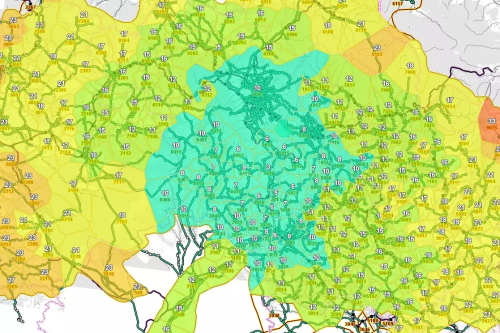
Interactive Digital Map of the Liberec Region
- Topographic overview of route alignments
- Surveyed locations of stops, service information.
- Route and stop assignments to zones and subzones